Qelvoriant
Slate Framework
Slate Framework
Couldn't load pickup availability
1. Problem Statement
As C# applications grow beyond individual components, managing several connected operations introduces challenges involving execution order, data handling, and application structure. Learners may understand classes, collections, and design patterns while remaining uncertain about how these elements behave when operations take different amounts of time to complete. Reading information from files, coordinating asynchronous tasks, and handling interruptions require additional knowledge about application behavior. Poorly organized workflows can introduce repeated logic, unexpected state changes, and complicated relationships between processing components. Without a structured understanding of these concepts, learners may find it difficult to design applications that coordinate multiple operations while keeping their internal logic understandable.
2. Solution
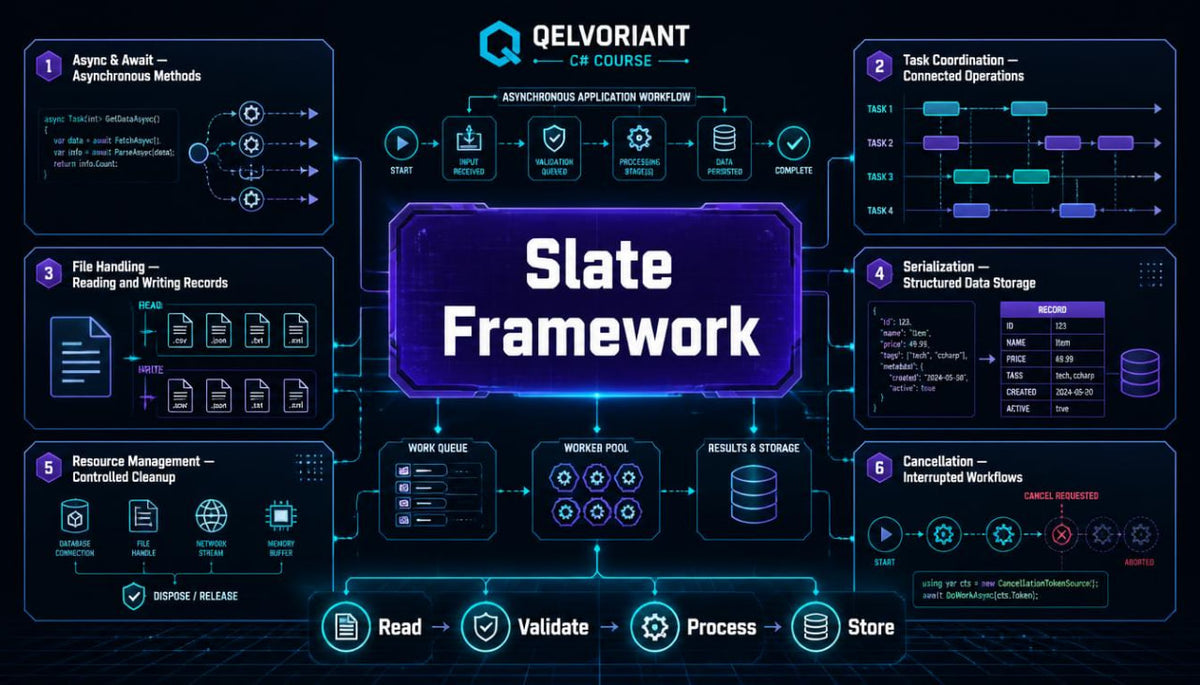
Slate Framework introduces practical approaches to organizing connected C# operations through a sequence of architectural and technical lessons. The course examines asynchronous programming, task coordination, file handling, structured data, resource management, and separation of component responsibilities. Each module connects language features with examples that demonstrate how information moves through an application. Guided exercises encourage learners to examine execution sequences, investigate interruptions, and compare alternative approaches to organizing related operations. The concluding workshop combines these concepts within a structured information-processing application that includes asynchronous tasks, file-based records, validation, and reporting.
3. What's Inside
Module 1 — Beyond the Straight Line of Execution
The opening module examines how C# instructions execute and why some operations require a different approach to coordination.
Learners revisit sequential execution before exploring situations in which an application must wait for an operation to complete.
The materials introduce asynchronous programming and explain how it differs from simply arranging instructions in a sequence.
Annotated examples demonstrate operations that return task representations and how other sections of an application can respond to their completion.
Learners examine the relationship between starting an operation, awaiting its result, and continuing the surrounding workflow.
Practical exercises involve tracing execution sequences, identifying dependent operations, and explaining how asynchronous behavior changes the order in which results become available.
Module 2 — Understanding Async and Await
This module develops a detailed understanding of the async and await keywords within C#.
Learners examine asynchronous method declarations, task-returning methods, and the relationship between awaited expressions and returned values.
The course explains the difference between an operation that produces a result and one that performs an action without returning a calculated value.
Examples demonstrate asynchronous calculations, delayed operations, and methods that coordinate several tasks.
The materials also examine how exceptions move through asynchronous methods and why their handling requires attention to the execution flow.
Exercises encourage learners to rewrite selected sequential examples, examine task completion, and identify operations that depend on earlier results.
Module 3 — Coordinating Multiple Tasks
Applications frequently need to manage several operations that are related but do not necessarily execute in a fixed sequence.
This section explores task coordination and introduces techniques for examining the completion of multiple asynchronous operations.
Learners study situations in which several independent tasks can be started and their results collected afterward.
Examples demonstrate combining task results, waiting for grouped operations, and handling situations where one task encounters an unexpected condition.
The materials explain the distinction between independent operations and tasks that require information from another operation.
Additional discussions introduce the importance of avoiding unnecessary shared-state changes.
Practical activities involve building small task groups, comparing execution sequences, and examining how different coordination decisions influence application behavior.
Module 4 — Working with Files and Persistent Information
Many C# applications need to retain information beyond a single execution session.
This module introduces file operations and explains how information can be written, retrieved, and interpreted through defined processing steps.
Learners examine text files, structured records, and the relationship between in-memory objects and stored information.
Examples demonstrate reading lines, organizing retrieved values, and writing calculated summaries to a separate file.
The course also introduces serialization concepts, including the conversion of structured objects into representations suitable for storage.
The materials discuss file paths, character encoding, and the importance of handling missing or incomplete information.
Exercises involve examining fictional datasets, organizing stored records, and creating methods that separate file operations from data-processing logic.
Module 5 — Resource Management and Controlled Cleanup
Operations involving files and external resources introduce responsibilities beyond ordinary value calculations.
This module examines how C# manages resources that require deliberate cleanup.
Learners explore disposable objects, resource lifetimes, and the role of using declarations in managing temporary resources.
The materials explain how a resource can be created, used, and released within a clearly defined scope.
Examples demonstrate file streams and other objects that hold resources during application execution.
The course also considers what happens when an operation encounters an exception before its ordinary completion point.
Practice activities involve tracing resource lifetimes, reorganizing resource-handling code, and identifying where cleanup responsibilities belong.
Module 6 — Interruptions, Cancellation, and Error Handling
Not every operation reaches its intended completion point.
This module explores how an application can respond when an operation is interrupted, cancelled, or unable to continue.
Learners examine cancellation signals and how cooperative cancellation can be incorporated into asynchronous workflows.
The materials explain the relationship between cancellation requests and the code that observes them.
Examples demonstrate checking whether an operation should continue and recording the reason a processing sequence ended.
The course also examines exception handling within task-based operations, including the difference between invalid input and an unexpected execution failure.
Exercises involve tracing interrupted workflows, examining partial results, and writing understandable status messages.
Module 7 — Organizing Application Layers
The final technical module brings earlier concepts into a broader architectural discussion.
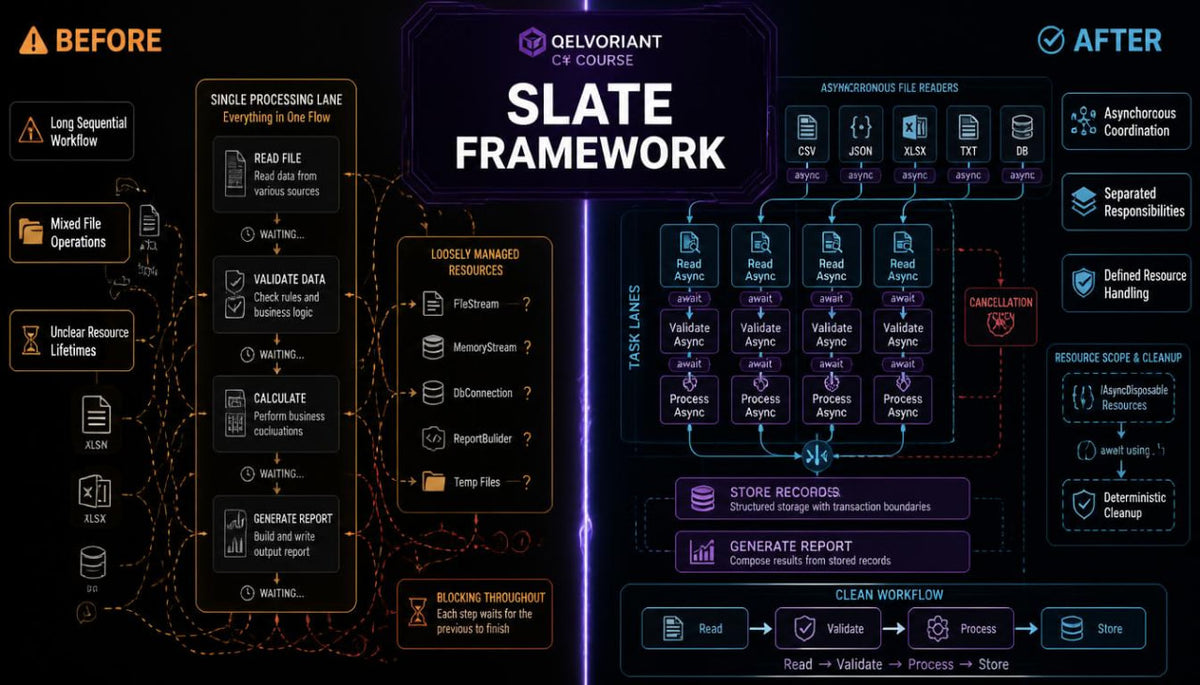
Learners examine the responsibilities involved in receiving information, validating records, performing calculations, and storing results.
The course introduces separation between data representation, processing logic, and storage operations.
Examples demonstrate how interfaces and constructor-based dependencies can connect components without placing every operation inside one class.
The materials also examine the relationship between synchronous calculations and asynchronous file operations.
Learners practice dividing a workflow into understandable stages and identifying how information passes between them.
Review exercises encourage comparison of alternative component arrangements and discussion of their structural differences.
Applied Workshop — The Structured Activity Archive
The concluding workshop connects the main topics of Slate Framework within a C# application designed around fictional activity records.
Learners begin by examining an application outline containing record definitions, validation rules, processing components, and file-storage responsibilities.
The first stage involves creating classes that represent activity entries and their associated information.
The second stage introduces methods for reading stored records and interpreting their contents.
Learners then develop processing operations that classify information, calculate summaries, and identify entries matching particular conditions.
Asynchronous methods coordinate file operations and reporting activities.
A separate component handles validation, while another prepares the resulting information for storage.
The workshop also includes exercises involving interrupted operations, missing records, and incomplete data.
Learners examine how these scenarios affect the surrounding workflow and how different components respond.
A final revision activity introduces an additional reporting requirement and invites learners to adapt the existing structure while preserving its defined responsibilities.
4. Who Is This For?
Slate Framework is intended for learners who have already studied foundational C# programming, object-oriented concepts, collections, interfaces, and introductory application architecture.
The course is suitable for individuals who want to examine how connected programming components behave during asynchronous execution and file-based operations.
It may also be useful for learners who have experience writing smaller applications and would like to explore more detailed approaches to organizing data movement and resource responsibilities.
Familiarity with classes, methods, exception handling, delegates, and interfaces is recommended.
The materials emphasize technical reasoning, code examination, architectural organization, and practical experimentation.
Learners are encouraged to trace execution sequences, investigate different input conditions, and revise application components through the guided exercises.
5. What You'll Learn
Through the written lessons, annotated examples, and applied activities, learners will explore:
-
Asynchronous programming: Understand the purpose of asynchronous operations within C# applications.
-
Async and await: Examine asynchronous methods and task completion behavior.
-
Task coordination: Organize several related operations and collect their results.
-
Execution flow: Trace how instructions behave when operations complete at different times.
-
File handling: Read, interpret, and write structured information.
-
Data serialization: Explore how structured objects can be represented for storage.
-
Resource management: Understand resource lifetimes and cleanup responsibilities.
-
Cancellation handling: Examine how operations respond to interruption requests.
-
Exception management: Investigate unexpected behavior within asynchronous workflows.
-
Application layers: Separate information representation, processing, and storage responsibilities.
-
Component dependencies: Connect application components through defined interfaces.
-
Workflow organization: Arrange validation, processing, and reporting into coordinated stages.
-
Code investigation: Examine execution behavior through targeted test cases.
-
Practical application development: Combine asynchronous methods, file operations, and architectural components within a connected C# project.
6. Course Purchase and 30-Day Refund Information
Slate Framework is a paid educational course containing structured written lessons, annotated C# examples, architectural explanations, and guided coding activities.
30-Day Refund Period
Learners may submit a refund request within 30 days of purchase, according to the conditions described in Qelvoriant's published Refund Policy.
The policy outlines the applicable eligibility requirements, request procedure, and information concerning refund processing.
- 📥 Digital file available after purchase
- 📚 Long-term availability
- 🔒 Secure checkout
- 📅 Content updated in 2026
Self-paced learning overview
How are Qelvoriant courses organized?
How are Qelvoriant courses organized?
Our C# courses follow a structured approach that connects technical explanations with practical coding exercises. Each course covers a defined set of topics through written lessons, examples, and review activities. The collection progresses from introductory concepts toward deeper programming techniques and application design.
Do I need previous programming experience?
Do I need previous programming experience?
The required starting knowledge depends on the course you choose. Introductory materials explain foundational programming ideas, while later courses explore topics that benefit from earlier C# study. We recommend reading each course outline to understand its subject matter and suggested preparation.
Can I study the materials at my own pace?
Can I study the materials at my own pace?
The courses are arranged for independent study, allowing learners to work through the written explanations and exercises according to their own schedules. You can revisit earlier topics, examine code examples, and repeat practice activities when additional review is helpful.
Share