Qelvoriant
Drift Kit
Drift Kit
Couldn't load pickup availability
1. Problem Statement
After studying introductory C# syntax, learners often encounter difficulties when combining separate concepts into complete coding tasks. Understanding a variable or conditional statement individually does not automatically explain how several instructions should interact. Working with collections, handling different input values, and dividing code into methods introduces new questions about organization and logical flow. Small mistakes in conditions, data handling, or method calls can also make code behave differently than intended. Without guided practice connecting these topics, learners may find it difficult to move from reading examples to developing their own structured solutions.
2. Solution
Drift Kit introduces connected C# exercises that demonstrate how foundational language elements can be combined into practical coding structures. The course organizes its materials around data handling, conditional logic, repetition, methods, and introductory collection operations. Each section includes explanations, annotated examples, and activities that encourage learners to examine the relationship between individual instructions. Guided coding tasks introduce ways to divide larger problems into smaller operations while maintaining readable code. The concluding activity brings the studied concepts together in a small data-processing application that learners can examine, modify, and extend.
3. What's Inside
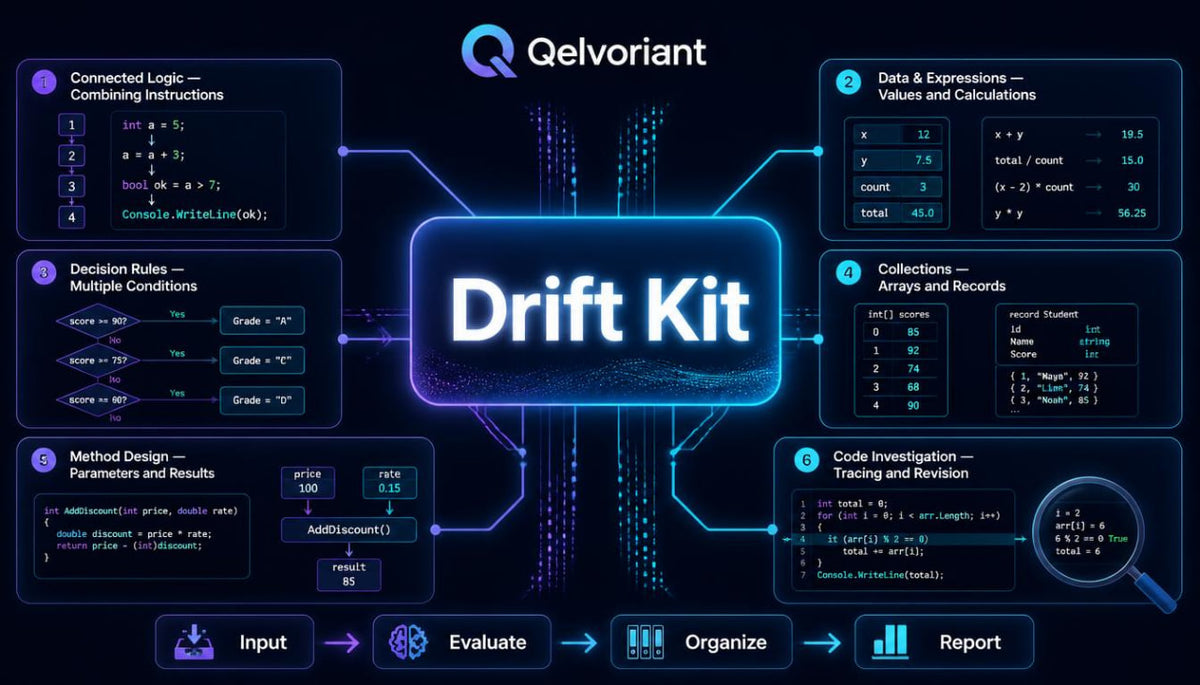
Module 1 — From Individual Statements to Connected Logic
The opening module explores how separate C# instructions become part of a coordinated sequence.
Learners begin by revisiting variables, expressions, conditions, and loops through examples that require several operations to work together.
The materials explain how values move between statements and how earlier calculations can influence later decisions.
Special attention is given to the order of execution, the relationship between conditions, and the importance of descriptive naming.
Practical exercises involve reading short code segments, predicting their behavior, and modifying individual statements to observe how the overall logic changes.
By the end of this module, learners will have examined several approaches to organizing related instructions into understandable sequences.
Module 2 — Working with Data and Expressions
Data appears throughout programming tasks, and understanding how it is represented contributes to clearer code.
This module examines numerical values, text, logical expressions, and conversions between compatible data types.
Learners study how calculations are constructed, how operators affect expressions, and how intermediate results can be stored for later use.
The course also introduces techniques for examining input values before incorporating them into calculations.
Examples include processing quantities, comparing recorded values, formatting text, and constructing small calculation routines.
Exercises encourage learners to distinguish between data representation, evaluation, and the resulting behavior of a code segment.
Module 3 — Building Decisions with Multiple Conditions
Many coding tasks require several conditions to be examined before an action is selected.
This module develops the introductory understanding of conditional statements through examples involving connected decision rules.
Learners explore nested conditions, comparison operators, and logical expressions that combine different criteria.
The materials demonstrate how condition ordering can influence behavior and why overlapping rules deserve careful examination.
Exercises involve categorizing values, checking whether data meets specified conditions, and tracing different execution paths.
A short workshop introduces a record-classification task in which learners develop rules, examine sample inputs, and compare the results with expected classifications.
Module 4 — Collections and Repeated Operations
This section introduces ways to organize related values and perform operations across groups of data.
Learners explore arrays and introductory collection structures, including how individual elements can be identified, examined, and updated.
Examples demonstrate using loops to process sequences, calculate totals, count matching entries, and identify values that meet particular conditions.
The relationship between collection boundaries and loop conditions is explained through annotated code.
Additional activities introduce searching through values and creating summaries from a collection.
The module concludes with a guided exercise in which learners organize a small group of records and produce a summary based on defined criteria.
Module 5 — Methods That Divide the Work
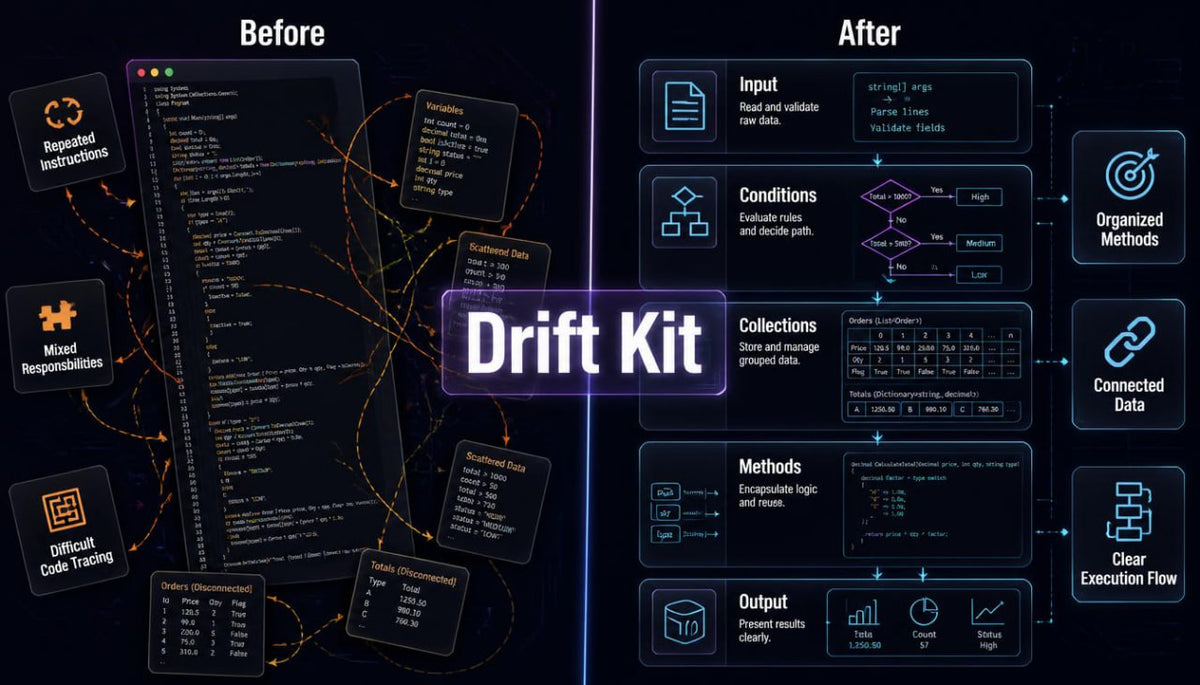
As coding tasks become more detailed, placing every instruction into one continuous sequence can make the logic difficult to follow.
This module examines how methods can divide a task into smaller, named operations with defined responsibilities.
Learners study parameters, arguments, return values, and the movement of information between method calls.
Examples illustrate the difference between methods that calculate values, methods that evaluate conditions, and methods that coordinate several operations.
The written materials also examine method naming, repeated code, and the relationship between clear responsibilities and readable structure.
Practice activities involve reorganizing longer code examples, identifying repeated operations, and extracting selected instructions into separate methods.
Module 6 — Reading, Testing, and Revising Code
Writing instructions is one part of programming; understanding their behavior is another.
This module introduces a practical approach to examining code through sample inputs, expected outputs, and step-by-step tracing.
Learners explore common problems involving incorrect conditions, unexpected values, collection boundaries, and repeated operations.
The materials demonstrate how to examine the state of variables during execution and compare observed behavior with intended logic.
Exercises invite learners to investigate intentionally flawed code examples, explain the underlying issue, and suggest appropriate revisions.
The module also introduces the importance of checking unusual input values and considering how code behaves outside ordinary examples.
Guided Workshop — The Record Organizer
The concluding workshop connects the central topics from Drift Kit through a small C# data-processing task.
Learners work with a collection of fictional records containing identifiers, categories, and numerical values.
The activity involves examining the records, applying classification conditions, calculating summaries, and presenting organized results.
Guided stages demonstrate how the task can be divided into methods with separate responsibilities.
Review questions encourage learners to explain their decisions, examine different input scenarios, and consider alternative code structures.
The workshop concludes with suggestions for extending the activity through additional categories, calculations, and validation rules.
4. Who Is This For?
Drift Kit is intended for learners who have encountered basic C# syntax and would like to explore how individual concepts are combined into connected coding tasks.
The course is suitable for individuals familiar with variables, elementary conditions, and basic loops who want additional practice with methods and collections.
It may also be useful for learners returning to C# after studying introductory materials and looking for a structured opportunity to revisit foundational ideas.
The explanations introduce each topic in context, while the exercises encourage independent examination and experimentation.
Learners should be prepared to read code examples, trace instructions, revise existing solutions, and work through practical activities at their own pace.
5. What You'll Learn
Through the course materials and exercises, learners will explore the following C# topics:
-
Connected programming logic: Combine variables, expressions, conditions, and loops within a single coding task.
-
Data handling: Work with numerical, textual, and logical values.
-
Conditional structures: Develop decision rules using comparisons, nested conditions, and logical operators.
-
Collection fundamentals: Organize related values within arrays and introductory collections.
-
Iteration techniques: Process sequences of information through repeated operations.
-
Method design: Divide related instructions into smaller, named units.
-
Parameters and return values: Examine how methods receive information and return calculated results.
-
Code organization: Identify repeated instructions and reorganize them into reusable structures.
-
Logical analysis: Trace execution paths and explain how different inputs affect behavior.
-
Error investigation: Examine incorrect conditions, unexpected results, and common indexing mistakes.
-
Data summaries: Calculate totals, count matching records, and organize collected information.
-
Practical coding: Apply several foundational concepts within a small record-processing exercise.
6. Course Purchase and 30-Day Refund Information
Qelvoriant provides Drift Kit as a paid educational course containing structured written lessons, code examples, and practical exercises.
30-Day Refund Period
Learners may submit a refund request within 30 days of purchase, in accordance with the store's published Refund Policy. The policy describes the applicable conditions and the procedure for submitting a request.
Clear Purchase Information
The course outline describes the educational subjects and learning activities included in Drift Kit so learners can review the materials before making a purchasing decision.
The course is intended for independent C# study and practical exploration. Individual learning progress varies according to previous knowledge, study time, and participation in the exercises.
- 📥 Digital file available after purchase
- 📚 Long-term availability
- 🔒 Secure checkout
- 📅 Content updated in 2026
Self-paced learning overview
How are Qelvoriant courses organized?
How are Qelvoriant courses organized?
Our C# courses follow a structured approach that connects technical explanations with practical coding exercises. Each course covers a defined set of topics through written lessons, examples, and review activities. The collection progresses from introductory concepts toward deeper programming techniques and application design.
Do I need previous programming experience?
Do I need previous programming experience?
The required starting knowledge depends on the course you choose. Introductory materials explain foundational programming ideas, while later courses explore topics that benefit from earlier C# study. We recommend reading each course outline to understand its subject matter and suggested preparation.
Can I study the materials at my own pace?
Can I study the materials at my own pace?
The courses are arranged for independent study, allowing learners to work through the written explanations and exercises according to their own schedules. You can revisit earlier topics, examine code examples, and repeat practice activities when additional review is helpful.
Share